Showing posts with label Flume. Show all posts

Monday, May 20, 2019

Flume - Configuration


Hello Friends , in this blog post we will understand how to configure Flume agent and will implement it.

We already know that every flume program has three important parts :-

Source
Channel
Sink
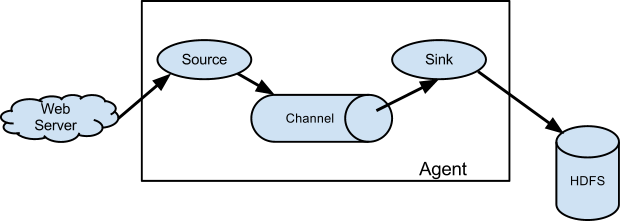
Image result for flume images hadoop
We will start configuring these three in our configuration file.The configuration file should be stored in a local filesystem.The configuration file can include Source,channel and Sink.In the configuration file, the properties of source ,channel and sink in an agent are defined  and are coupled together.


# Name the components on this agent
a1.sources = r1
a1.sinks = k1
a1.channels = c1

# Describe/configure the source
a1.sources.r1.type = netcat
a1.sources.r1.bind = localhost
a1.sources.r1.port = 44444

# Describe the sink
a1.sinks.k1.type = logger

# Use a channel which buffers events in memory
a1.channels.c1.type = memory
a1.channels.c1.capacity = 1000
a1.channels.c1.transactionCapacity = 100

# Bind the source and sink to the channel
a1.sources.r1.channels = c1
a1.sinks.k1.channel = c1
 
We will save the above configuration with the filename example.conf

How to run the Flume agent ?

Below is the basic syntax for running the Flume agent.

$ bin/flume-ng agent -n $agent_name -c conf -f conf/flume-conf.properties.template

We will run our example with the below command :

$ bin/flume-ng agent --conf conf --conf-file example.conf --name a1 -Dflume.root.logger=INFO,console


In a separate terminal , we will write the below command :

$ telnet localhost 44444
Trying 127.0.0.1...
Connected to localhost.localdomain (127.0.0.1).
Escape character is '^]'.
Hello world! <ENTER>
OK
 
Again switch back to the original Flume screen

INFO source.NetcatSource: Source starting
INFO source.NetcatSource: Created serverSocket:sun.nio.ch.ServerSocketChannelImpl[/127.0.0.1:44444] 15:32:34 INFO sink.LoggerSink: Event: { headers:{} body: 48 65 6C 6C 6F 20 77 6F 72 6C 64 21 0D          Hello world!. }


This completes our first Flume configuration and our program with telnet.

Sunday, October 21, 2018

Flume - Architecture


Flume is a highly reliable tool for aggregating and transporting large amount of streaming data such as log files,events from various sources to centralized data source.

Flume chiefly consist of three components :-

Source 
Channel  
Sink


Source: It accepts the data from the incoming streamline and stores the data in the channel.
Channel: Normally, the reading speed is faster than the writing speed. Thus, we need some buffer to match the read & write speed difference. Basically, the buffer acts as a intermediary storage that stores the data being transferred temporarily and therefore prevents data loss. Similarly, channel acts as the local storage or  a temporary storage between the source of data and persistent data in the HDFS.
Sink: Then, our last component i.e. Sink, collects the data from the channel and commits or writes the data in the HDFS permanently.

Advantages of Flume :-

  • It is reliable, salable, fault tolerant and customizable for different sources and sinks.
  • Flume provides a steady flow of data between read and write operations.
  • Flume feed online streaming data from various sources like network traffic, social media, email messages, and log files into HDFS.
  • Supports multiple data flow like multiple-hop, fan-in, and fan-out.
Disadvantages of Flume :-

  • Flume has complex topology.
  • It does not support for data replication.It does not guarantee 100% unique message delivery (duplicate messages might enter at any times).

Tuesday, October 9, 2018

Flume - Introduction

Flume is a highly reliable tool for aggregating and transporting large amount of streaming data such as log files,events from various sources to centralised data source.

What is streaming data ?

As per AWS , Streaming Data is data that is generated continuously by thousands of data sources, which typically send in the data records simultaneously, and in small sizes (order of Kilobytes). Streaming data includes a wide variety of data such as log files generated by customers using your mobile or web applications, e commerce purchases, in-game player activity, information from social networks, financial trading floors, or geo spatial services, and telemetry from connected devices or instrumentation in data centers.

Basic Architecture Of Flume :-
 
The data from data sources like Twitter,Facebook and Web server are passed through flume and stored in a centralized data store like HDFS, HBASE.

But a question arises why PUT and HDFS -CopyFromLocal not efficient ?
⦁    'PUT' command can transfer one data at a time .However , the log data are generated at a much higher rate than the expected.
⦁    For PUT command the data need to be packaged and should be ready for the upload.but with the case of web server logs it is not possible at all.

Apache Flume is a tool for data ingestion in HDFS. It collects, aggregates and transports large amount of streaming data such as log files, events from various sources like network traffic, social media, email messages etc. to HDFS. Flume is a highly reliable & distributed.
The main idea behind the Flume’s design is to capture streaming data from various web servers to HDFS. It has simple and flexible architecture based on streaming data flows. It is fault-tolerant and provides reliability mechanism for Fault tolerance & failure recovery.

Delta Lake - Time Travel

  Time Travel allows you to query, restore, or compare data from a previous version of a Delta table. Delta Lake automatically keeps tra...